Building the BotolaPro Fantasy App Part2: Build the Scraper Service
Building the BotolaPro Fantasy App Part2: Build the Scraper Service#
To understand what this article is about, checkout the previous post at:
https://mmoumni.com/posts/building-the-botolapro-fantasy-app-part1-scrapping-the-base-data
In the previous article, I discussed the high-level architecture of the entire application. In this article, I will focus on the scraper service.
System Design:#
To avoid distracting myself with too many actions that the scraper API could support, I chose to start small and extend it as needs arise.
To get a functional fantasy app MVP, the core requirement is an endpoint that fetches the lineup for a given pair of opposing teams.
At high level, the architecture is straightforward and consists of two main components: The Engine and the Scraper service.
So What does this endpoint do, and What do the request and response look like?
This endpoint scrapes the SofaScore website to retrieve the lineup for the match specified in the request. The lineup includes all the players who took part in the match, along with their statistics.
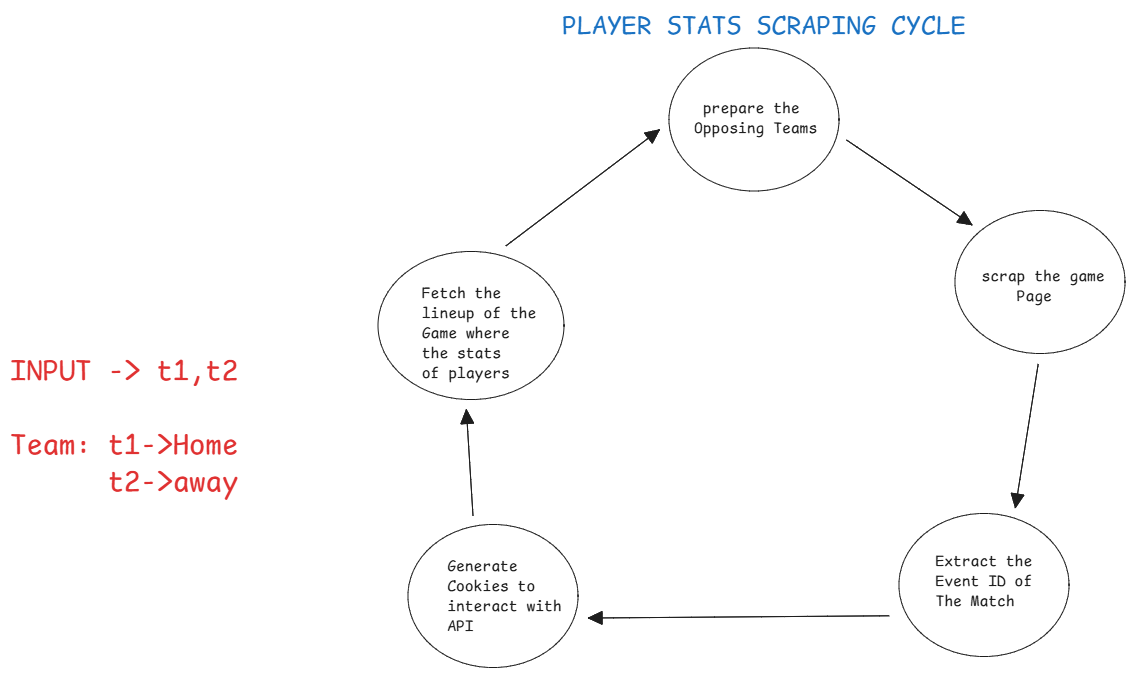
Players Scraping Cycle
To ensure a smooth workflow, I had to consider how the Scraper’s response would be structured for the Engine. Since the Engine queries the scraper for updates in real time, a consistent and well-defined format is essential.
The Engine expects the scraper to provide the latest players information for a match. each player in the response incudes a unique ID and their individual stats. The Engine then matches these IDs to its existing records and updates each player’s data accordingly.
Below the API Endpoint Design:
ENDPOINT:

**/api/v1/football/match/lineup**      **POST**

Request Body Type: Json
body:
{
    team1: "olympic-safi" | string (slug)
    team2: "wydad-casablanca" | string (slug)
}

Response Body Type: Json
{
            "confirmed": True,
            "home": {
                "players": [
                    {
                        "player": {
                            "name": "John Doe",
                            "slug": "john-doe",
                            "shortName": "J. Doe",
                            "position": "Forward",
                            "jerseyNumber": "10",
                            "height": 180,
                            "userCount": 1000,
                            "gender": "M",
                            "id": 1,
                            "country": {
                                "alpha2": "US",
                                "alpha3": "USA",
                                "name": "United States",
                                "slug": "united-states"
                            },
                            "marketValueCurrency": "USD",
                            "dateOfBirthTimestamp": 631152000,
                            "proposedMarketValueRaw": {
                                "value": 5000000,
                                "currency": "USD"
                            },
                            "fieldTranslations": {
                                "nameTranslation": {"en": "John Doe"},
                                "shortNameTranslation": {"en": "J. Doe"}
                            }
                        },
                        "teamId": 1,
                        "shirtNumber": 10,
                        "jerseyNumber": "10",
                        "position": "Forward",
                        "substitute": False,
                        "statistics": {
                            "goals": 1,
                            "assists": 0,
                            "minutesPlayed": 90,
                            "rating": 7.5,
                            "totalPass": 45,
                            "accuratePass": 38
                        }
                    }
                ],
                "supportStaff": [],
                "formation": "4-4-2",
                "playerColor": {
                    "primary": "#FF0000",
                    "number": "#FFFFFF",
                    "outline": "#000000",
                    "fancyNumber": "#FFFFFF"
                },
                "goalkeeperColor": {
                    "primary": "#FF0000",
                    "number": "#FFFFFF",
                    "outline": "#000000",
                    "fancyNumber": "#FFFFFF"
                }
            },
            "away": {
                "players": [
                    {
                        "player": {
                            "name": "Jane Smith",
                            "slug": "jane-smith",
                            "shortName": "J. Smith",
                            "position": "Midfielder",
                            "jerseyNumber": "8",
                            "height": 175,
                            "userCount": 800,
                            "gender": "F",
                            "id": 2,
                            "country": {
                                "alpha2": "GB",
                                "alpha3": "GBR",
                                "name": "United Kingdom",
                                "slug": "united-kingdom"
                            },
                            "marketValueCurrency": "GBP",
                            "dateOfBirthTimestamp": 662688000,
                            "proposedMarketValueRaw": {
                                "value": 3000000,
                                "currency": "GBP"
                            }
                        },
                        "teamId": 2,
                        "shirtNumber": 8,
                        "jerseyNumber": "8",
                        "position": "Midfielder",
                        "substitute": False,
                        "statistics": {
                            "goals": 0,
                            "assists": 1,
                            "minutesPlayed": 90,
                            "rating": 7.0,
                            "totalPass": 60,
                            "accuratePass": 55
                        }
                    }
                ],
                "supportStaff": [],
                "formation": "4-3-3",
                "playerColor": {
                    "primary": "#0000FF",
                    "number": "#FFFFFF",
                    "outline": "#000000",
                    "fancyNumber": "#FFFFFF"
                },
                "goalkeeperColor": {
                    "primary": "#0000FF",
                    "number": "#FFFFFF",
                    "outline": "#000000",
                    "fancyNumber": "#FFFFFF"
                }
            },
            "statisticalVersion": 1
        }

I don’t think this service needs authentication.
For more details you checkout the API docs at: [docs#/matches/match_lineup_api_v1_football_match_lineup_post)
How I built the Scraper Service:#
Implementing the scraping service is straightforward. The API takes the teams as input, and after exploring the SofaScore API, I identified how to extract the necessary Data.
On SofaScore, every sports activity is treated as an event, each with a unique ID. With this event ID, you can access all related information for a football match, this includes lineups, statistics, standings, and more.
Let’s say the event ID is 1402332423. You might think you can simply request the following URL:
https://www.sofascore.com/api/v1/event/1402332423/lineup
But it’s not that simple. The SofaScore API is not publicly accessible; direct requests from external users are blocked. To access these resources, you must include certain cookie headers in your request. After examining the network activity in the browser, I discovered that these cookies are generated the first time a user visits the SofaScore website.
Once the cookies are obtained, they are injected into the request headers to access the API.
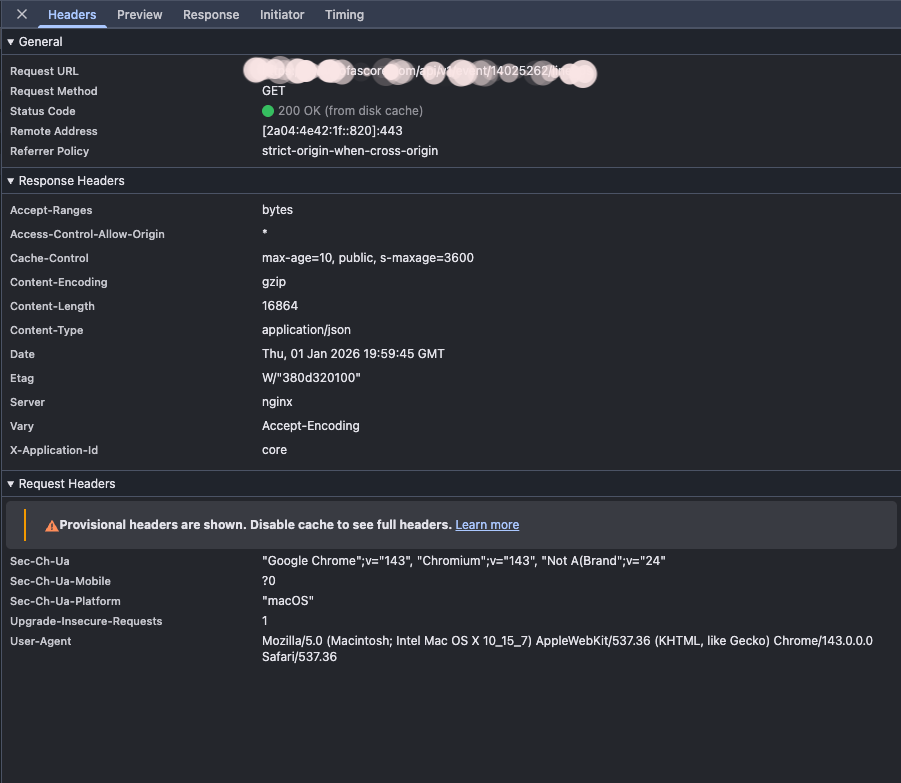
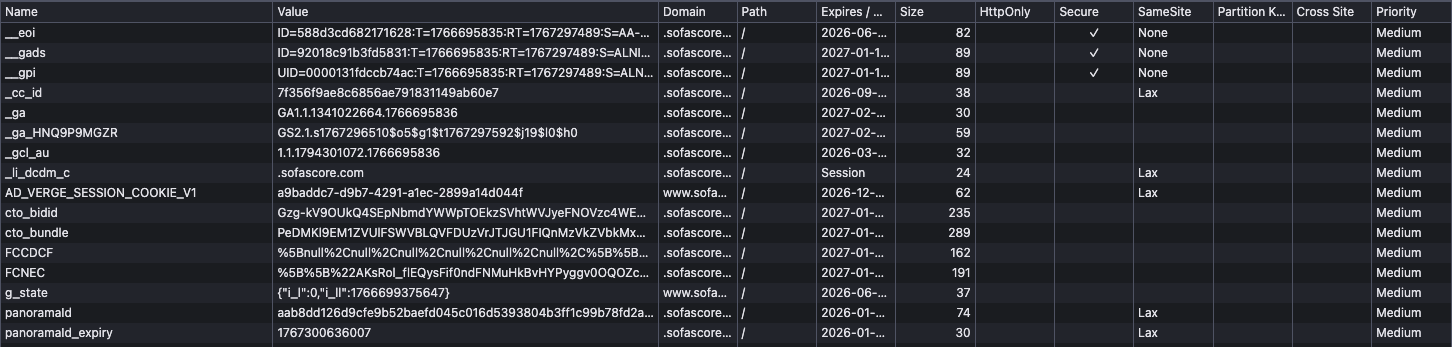
The service is simple for now but will be expanded with additional functionality later. Currently, it meets the Engine’s requirements for the Fantasy app MVP.
What’s next:#
With the Scraper API in place, I can now focus on designing and implementing the Engine. As the app’s core component, it calculates and maintains up-to-date player statistics. I’ll cover its implementation in a future blog post.
Thanks for your time, and I look forward to sharing the next update with you.